Deliver Better Service and Exceed Customer Expectations
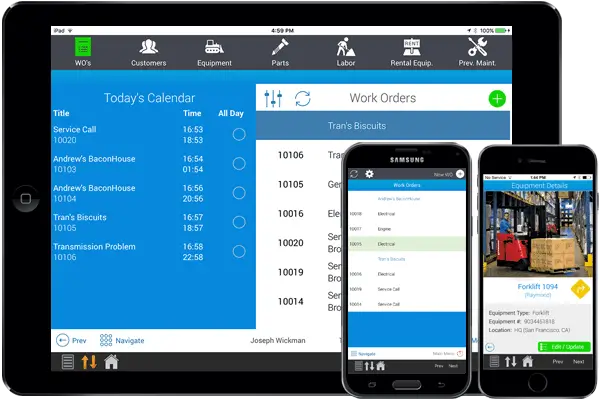
Field service jobs keep getting more complex, and customers expect fast, accurate answers from whoever shows up at their door. Our field service software puts the work order, customer account, equipment history, and parts information on each technician's mobile device, so they arrive prepared and can finish the job on the first visit.
Show Me How
Why Service Teams Choose Our Field Service Software
When service calls are automated, technicians can focus on the customer instead of paperwork, and dispatchers get fewer interruptions. The savings show up across the whole service chain, from dispatch and work order priorities to the parts and labor on each job.
Show Me How

Smarter Dispatching
Assign work orders by territory, proximity, skill set, or parts on hand, and use GPS to find the nearest available technician.

Fewer Return Trips
Send jobs to technicians who already carry the parts they need, so fewer visits end with a second trip.

Get Paid Sooner
Invoices are created as soon as the work is complete, which shortens the wait between finishing a job and getting paid.

Less Paperwork
Service reports, receipts, and timecards are generated automatically, so technicians spend their time with customers.

Bill for Everything
Parts, labor, travel time, mileage, and rental equipment are added to the invoice as the work happens, so nothing slips through.

Complete Service Records
Every job is stored with GPS locations, time stamps, signatures, and photos, giving you an accurate record of the work.

Happier Customers
Customers can submit and track service requests online and get automatic updates without calling your office.

Real-Time Management Insight
Managers can see staff location, status, and capacity as it changes and run reports on live data.

Use the Systems You Have
Connect to your ERP, CRM, and WMS so service data reaches the systems your team already relies on.
How It Works
Every step is tracked in one system, from the first service request to the final invoice.
Create & Dispatch
A dispatcher or customer creates the work order. Dispatchers assign it using your company's rules (territory, skills, parts on hand, current status) and it goes straight to the technician's device.
Service On Site
The technician reviews the customer account and equipment history before arriving. On site, they record parts, labor, travel time, photos, notes, and the customer's signature.
Invoice & Report
When the job is done, the software generates the invoice, service or PM report, receipt, and timecard. Managers can see the results right away in the management portal.
Guided Preventative Maintenance
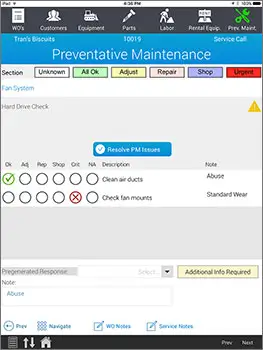
Define the preventative maintenance steps for each piece of equipment. When a technician performs PM, the app walks them through each step with visual cues and color coding, and makes sure every step is done before the work order can be finalized.
If the technician finds a problem, they can pick a resolution or create a new work order for it on the spot. PM results are saved with each piece of equipment, so your service records stay accurate.
Built for Your Whole Service Organization
Customers, dispatchers, technicians, and managers each get tools built around the work they do.

Customers Can Help Themselves
The built-in customer web portal lets customers enter and track service requests online instead of calling your office, which frees up your staff. Customers can:
- Submit work order requests, check the status of open work orders, and review past work, including what was done and who signed for it
- Look up the service history of each piece of equipment and request service on a specific unit
- Receive automatic emails and alerts about service requests, invoices, and upcoming maintenance, which can also bring in additional service revenue

Technicians Spend More Time With Customers
With the job details on their device, technicians make fewer calls to the office and skip the trips back to fill out paperwork.
- Work orders track travel and service time, equipment details and history, parts and labor, inventory levels, and corrective actions
- Document preventative maintenance and corrective actions with photos, notes, and signatures
- Electronic timecards record regular, premium, and overtime hours
- Check parts on hand, see inventory on nearby vehicles, and record purchases made in the field
- Service reports, invoices, receipts, and timecards are generated automatically

Dispatchers Send the Right Tech
Dispatchers create, assign, and update work orders by territory, proximity, skill set, or parts on hand. Real-time GPS shows each technician's location alongside customers and warehouses, so the nearest qualified tech gets the call.
Once a work order is assigned, it syncs to the technician's device with everything needed for the job, so they're well informed before they arrive.
Managers See What's Happening Now
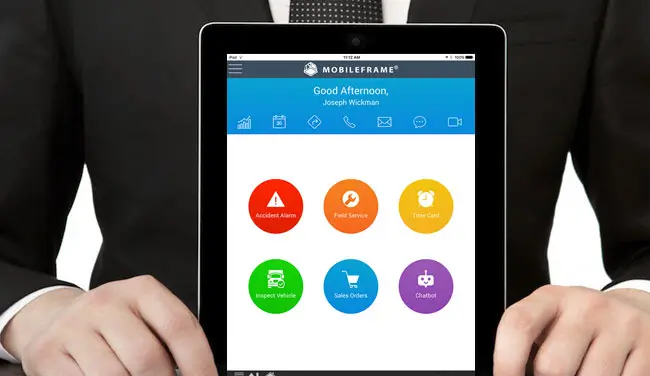
The management portal gives your team access to service data from anywhere, so they can deal with issues before they turn into problems.
- Track customer accounts and invoice automatically
- See staff location, status, and capacity in real time
- Connect to your ERP, CRM, and WMS systems
- Run reports on real-time data
Features of Our Field Service Management Software
Beyond dispatch and work orders, the software handles the details that affect billing, maintenance, and your service records.
See it in action
Instant Invoicing
Parts, labor, travel time, mileage, rental equipment, PM results, and warranties go onto the invoice automatically when the work is done.
Detailed Equipment History
Keep maintenance records, past breakdowns and repairs, parts and labor used, and notes for every piece of equipment.
Technician Inventory
When a technician uses a part, inventory goes down and the charge is added to the customer's invoice automatically.

Labor & Timekeeping
Labor and travel time are tracked for each technician, timecards are generated automatically, and labor charges are added to the invoice.

GPS & Mileage Tracking
See where technicians are and track their mileage to dispatch more efficiently, keep fleet costs down, and bill customers if you choose.

Rental Equipment Tracking
Record which rental equipment was used and for how long, and the matching line items and charges are added to the invoice.

Signatures & Photos
Capture electronic signatures and photos with each job, along with GPS locations and time stamps.

Customer Web Portal
Customers submit service requests, check their status, and review equipment history online.

Cross-Platform Access
Runs on Android, iOS, Windows, and the web, so every role can use the device that suits their work.
... and So Much More
We couldn't fit every feature on one page. If you don't see something you need, contact us and we'll walk you through it.
Flexible Platform &
Integration Capabilities
Our field service software is built on the MobileFrame no-code development platform, so you can adjust it to fit the way your team works and connect it to the systems you already use.
See it in action

Works on Any Device
Use it on Android, iOS, Windows, or the web. The mobile apps keep working without a connection and sync when one is available.

Connects to Your Backend
Integrate with your ERP, WMS, CRM, and other backend systems to get more out of the investments you've already made.

Pairs With Other Solutions
It works well on its own, and also alongside our asset management, inventory tracking, and timekeeping solutions.

Frequently Asked Questions
Answers to common questions about our field service software:
What devices does the field service software run on?
It runs on Android, iOS, and Windows devices and in a web browser, so technicians, dispatchers, and managers can each use the device that suits their work.
Does it work without an internet connection?
Yes. The mobile apps store the data technicians need on the device and sync automatically when a connection is available, so work can continue in areas with poor coverage.
How do dispatchers decide which technician gets a job?
Dispatchers can assign work orders by territory, proximity, skill set, parts on hand, status, or history, following whatever rules your company sets. GPS tracking shows where each technician is, so the nearest qualified tech can take the call.
Can customers submit and track service requests themselves?
Yes. The customer web portal lets customers enter service requests, check the status of open work orders, review past work and equipment history, and receive automatic alerts about requests, invoices, and upcoming maintenance.
Does it integrate with our ERP, CRM, or WMS?
Yes. The software is designed to integrate with existing backend systems such as ERP, CRM, and WMS. It can also work with other MobileFrame solutions like asset management and inventory tracking.
Can we customize the software for our processes?
Yes. It's built on MobileFrame's no-code development platform, so work orders, data fields, and workflows can be changed to match your business rules without traditional software development. You can also use the platform to build any other apps you need.
How does invoicing work?
The software records parts, labor, travel time, mileage, rental equipment, PM results, and warranties as the job progresses. When the service is complete, it generates the invoice, service or PM report, receipt, and timecard automatically.
How does the software handle preventative maintenance?
You define the PM steps for each piece of equipment. Technicians are guided through each step with visual cues and color coding, and they can resolve issues or create new work orders on the spot. PM results are saved with the equipment's service history.
Can we host the field service software ourselves?
Yes. MobileFrame isn't limited to a hosted SaaS model. You can deploy it on your own infrastructure or in your preferred cloud environment, which gives you control over your data, security policies, and system architecture.
What Is Field Service Software?
Field service software is a system for scheduling, dispatching, and managing work performed at customer sites. It typically includes work order management, technician scheduling, GPS tracking, mobile apps for technicians, parts and inventory tracking, and invoicing.
MobileFrame Field Service Software is a mobile field service management solution that runs on Android, iOS, Windows, and the web. It covers dispatch, work orders, preventative maintenance, technician inventory, timekeeping, rental equipment, and automatic invoicing, and it integrates with ERP, CRM, and WMS systems.