Everything You Need for a Successful Digital Transformation.
MobileFrame provides everything your business needs to bring your digital transformation to life and keep it running smoothly. Rapidly build, integrate, test, deploy, and manage cross-platform apps (Android, iOS, Windows & the Web) for any business process in days vs. the months of development required with other low-code platforms.

Amazingly Fast...
Our platform was designed specifically to make the design, development, integration, testing, and deployment of enterprise applications simpler, faster & more effective.

Rapid App Development Tools
Build your solutions 10× faster using our built-in Rapid App Development Tools. More below

Full-stack Visual Development
Create cross-platform apps quickly using drag-and-drop UI, workflow, and data modeling.
Code-free or Low-Code Approach
Empower developers & non-developers alike using either a code-free or low-code approach. More below

Mobile Made Easy
Easily create engaging, fully-native mobile apps with robust synchronization, an on-device database & business logic that works even when offline.

Faster Integrations
Built-in connectors for Enterprise systems (Active Directory, databases, web services & many more) make integrating to the rest of your Enterprise fast and easy. More below

Deploy Instantly
Create/modify apps and deploy them instantly. Apps & updates are automatically pushed to your users - no compiling or waiting for app stores.
Engaging User Experiences... Simplified.
Improve user adoption by building apps your workforce will love. Our platform helps you quickly deliver amazing cross-platform experiences across all form factors via drag-and-drop, visual design tools, auto-translation & much more.
 Pixel Perfect UI
Create beautiful apps for any device easily with our drag-and-drop visual design tools
 Cross-Platform Made Easy
Build your apps once and they'll work on every form factor - write once, deploy anywhere
 Create & Use Themes
Use our themes (or create your own) to easily deliver engaging UI/UX that is consistent across all apps
 Auto-translate Languages
Create apps in one language (ex: English) and have them automatically translated to other languages (ex: Spanish) making localization simple.
 Work Offline, Fully-native
Create apps that work even when disconnected (without any data loss or reduced performance) then sync automatically when a connection is available.
 No Delays, No Hidden Fees
Avoid app store approval delays and vendor customization fees. Create apps and/or make changes, and instantly deploy them to your users.

Artificial Intelligence meets No-Code Development
When you combine our industry leading No-Code App Development Platform with the power of Generative AI, you can deliver amazing functionality in your apps... faster than ever.
Integrate with Everything.
MobileFrame makes it fast & easy to integrate to any enterprise system or database including your existing ERP, CRM, and legacy systems.
Quick Connectors
Quickly & easily integrate using our built-in connectors or build your own custom connectors
Integration Wizard
Visually map out desired fields then let MobileFrame handle the complexities automatically
RESTful & SOAP Services
Easily integrate with REST APIs, SOAP-based services, or your own private web services
Legacy Systems
We provide a variety of tools for aging legacy systems including flat file import/export & more
Empower Everyone on Your Team
Give your developers & IT staff the tools they need to build apps 10× faster while also empowering non-developers with business process expertise to build apps too. From design through deployment, our mobile app development platform empowers developers & non-developers alike to create comprehensive enterprise solutions.
 Low-Code Approach for Developers & IT
The platform handles the tedious stuff (sync, security, encryption, scalability, source / version control, documentation, globalization / localization, UI optimizations & more) so you can focus on creating powerful apps. Use the built-in arsenal of functions to speed development and use your own custom code when desired.
 Code-free Approach for Everyone
Use a code-free approach to empower even non-developers to create cross-platform apps quickly & easily using drag-and-drop UI, workflow, data modeling, integrations and more. Line of business personnel can leverage their business expertise to create the apps they need without overburdening IT & development staff.
Rapid App Development & Deployment
Agile & Iterative
Empowers rapid iterative development & testing so you can experiment easily.
Visual Development
Visual tools for building your logic, UI & data models... no more annoying syntax errors.
Native Capabilities
Add device-native features (ex: photos, etc.) with a click, no special coding needed.
Auto-Refactoring
Make changes to apps, data tables, etc. & dependencies are automatically updated.
Flexible & Extensible
Easily extend your applications & backend processes with your own code.
Auto-Documentation
With a single click, the platform automatically generates complete documentation for you.
Avoid the Boring Stuff
The platform handles security, encryption, authentication, sync, localization, versioning, etc. so you can focus on your apps.
Auto-Correction
The system auto-corrects data-types, names, etc. & ensures only valid options are displayed.
& Much More...
There are too many features to cover them all here, so contact us to learn more about accelerating app development.
Cover the Entire Development Lifecycle

The MobileFrame platform provides complete lifecycle capabilities so you can design, develop, integrate, deploy, monitor and manage multi-channel apps — with everything from visual design & rapid app development tools to integration wizards, testing, and mobile device management built-in.
Simulate & Debug — Then Deploy Instantly
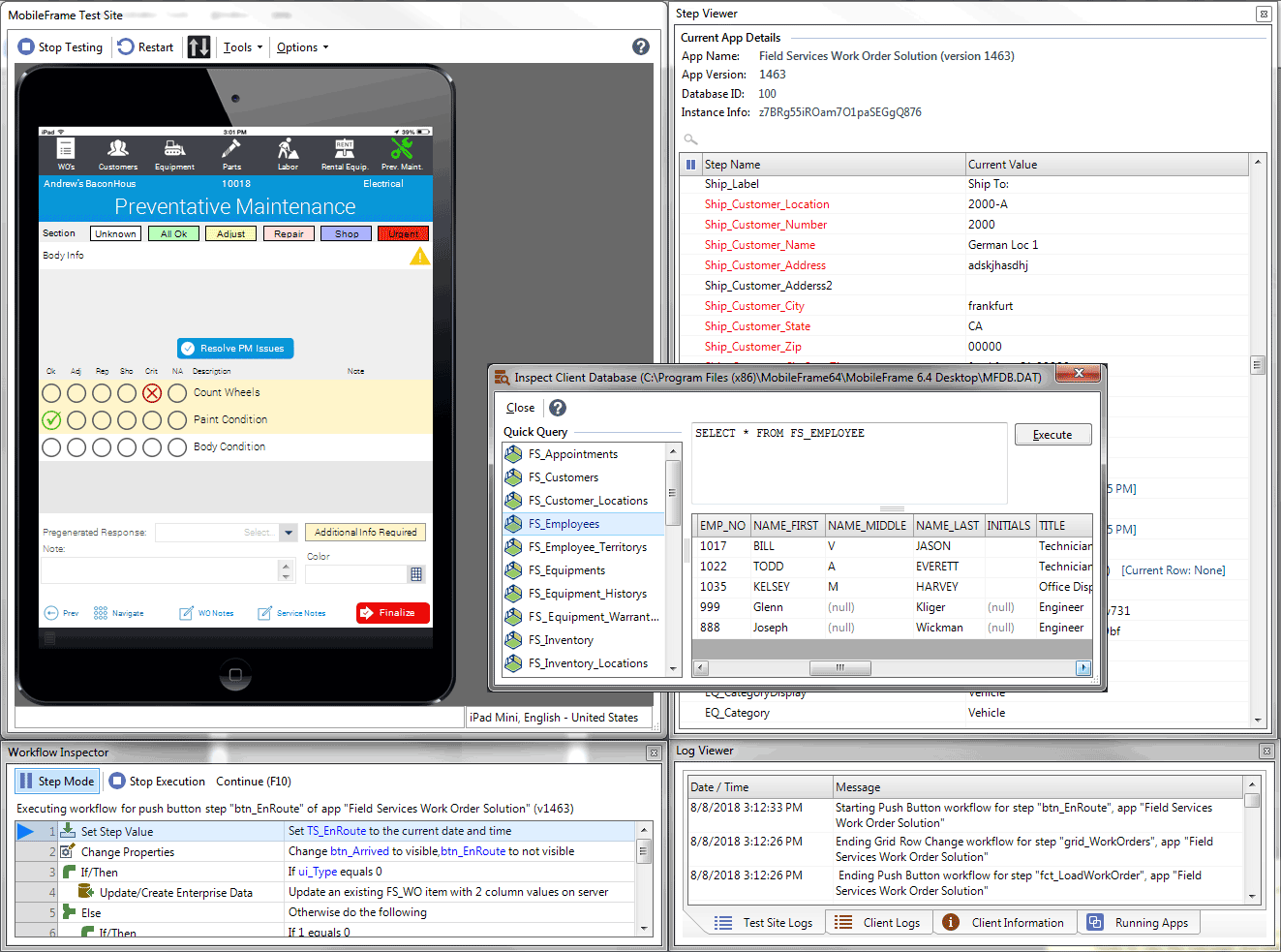
A built-in test environment with integrated diagnostics & debugging simulates live deployment without having to distribute native binaries. Step through client & server-side logic, identify bottlenecks, optimize performance, then deploy live apps instantly.
Mobile Device Management (MDM)
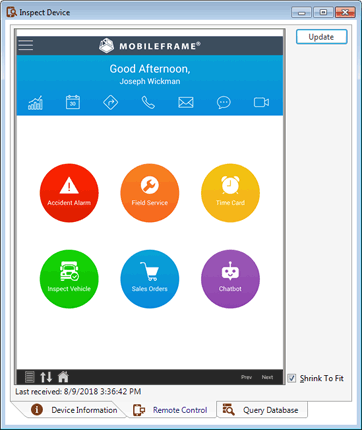
Control devices remotely including remote monitoring, resetting client databases, logging off users, triggering sync, etc. View device statistics, set rule-based actions, restrict app usage, and more — or — integrate seamlessly with your existing Enterprise Mobility Management (EMM) solutions such as Citrix XenMobile.
Web Portals and Reporting
Easily create web portals and custom web-based reports. For example, create management portals for your team or customer portals for your clients allowing them to create new service requests, view job/delivery status, view invoices, view progress, and more.

Everything is Enterprise-Class
MobileFrame is the code-free / low-code platform designed specifically for delivering enterprise solutions. MobileFrame supports anything from simple systems with minimal data to sophisticated systems with millions of records per device.
 Enterprise-class
Security & Encryption
Full FIPS (140-2 or better) compliant encryption end-to-end including all database(s), files, & client-server communications. Invisible 2 factor authentication. Supports third party identity management (Active Directory/LDAP, etc.)
 Enterprise-class
Synchronization
The MobileFrame app development platform includes automatic background synchronization with continuous delta synchronization of dataset changes to clients. Support offline access while automatically ensuring the right people get the right data when they connect.
Enterprise-class
Data Management
Truly native client database (work offline). Robust database options including sophisticated data management & distribution features and support for rich data types, indexes, automatic keys, queries, etc. Automatic schema mirroring between server & client.
 Enterprise-class
Scalability
Scale effortlessly. Use a single server or distribute components across multiple machines. Flexible / scalable server architecture accommodates growth and handles complex load balancing, disaster recovery, etc. via central server management tools.
Satisfied Customers ★★★★★
Customer satisfaction is now more important than ever. Thousands of our happy customers are using MobileFrame solutions & improving the satisfaction of their own customers.

 MobileFrame has allowed us to spin up new projects, faster, with more accurate data collection, and with way less overhead for managing large teams. We’ve deployed over 150 apps from scratch, centralized vital business intelligence, and turned unwieldy business intelligence into query-able datasets. MobileFrame’s solution has made our jobs easier and our world more organized.
David Stiger, VP of Gas Solutions @ Hydromax USA

Given the scope of our global operations, we required a mobile platform that would provide real-time insights into the progress at job sites. MobileFrame has accelerated our move away from paper-based systems, in fact, we deployed our first apps within 60 days of selecting MobileFrame as our mobility standard.
Elbert Rojas, QA Manager @ Kiewit













How can we help you succeed?
Contact us below to start a free trial, request more information, or just see a quick demo. Whatever you need, we're ready to help.